Computer's Information is Digital
- Bit/binary digit
- the smallest unit of information
- can have one of two value: 1 or 0
- can represent numbers, codes, or instructions
- byte: a collection of 8 bits
- using two symbols all numbers represented on a calculator as well as performing arithmetic
1 represents the on signals
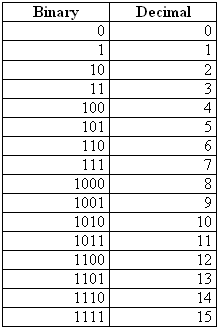
Decimal numbers- 0,1, 2, 3, 4, 5, 6, 7, 8, 9
the binary number system works the same way as the decimal number system, but with two digits instead of ten.
- so we add a second column twice the value of the column before
- ex. 10, 11, 100, 101, 110 , 111, 1000...
- binary number system
- binary denotes all numbers with combinations of two digits
- decimal numbers are automatically converted into binary numbers and vice versa
- binary number processing is completely hidden from the
- ASCII Code
- American Standard Code for Information Interchange
- The most widely used code
- Unicode
- A coding scheme that supports 65,000 unique characters

Bits as Instructions in Programs
- Programs are stored as collections of bits
- Instructions are represented in binary notation through use of codes
- Byte= 8 bits
- Kilobyte (KB)= 1 thousand bytes
- Megabyte(MB)= 1 million bytes
- Gigabytes(GB)= 1 billion bytes
- Terabytes (TB)= 1 trillion bytes

No comments:
Post a Comment